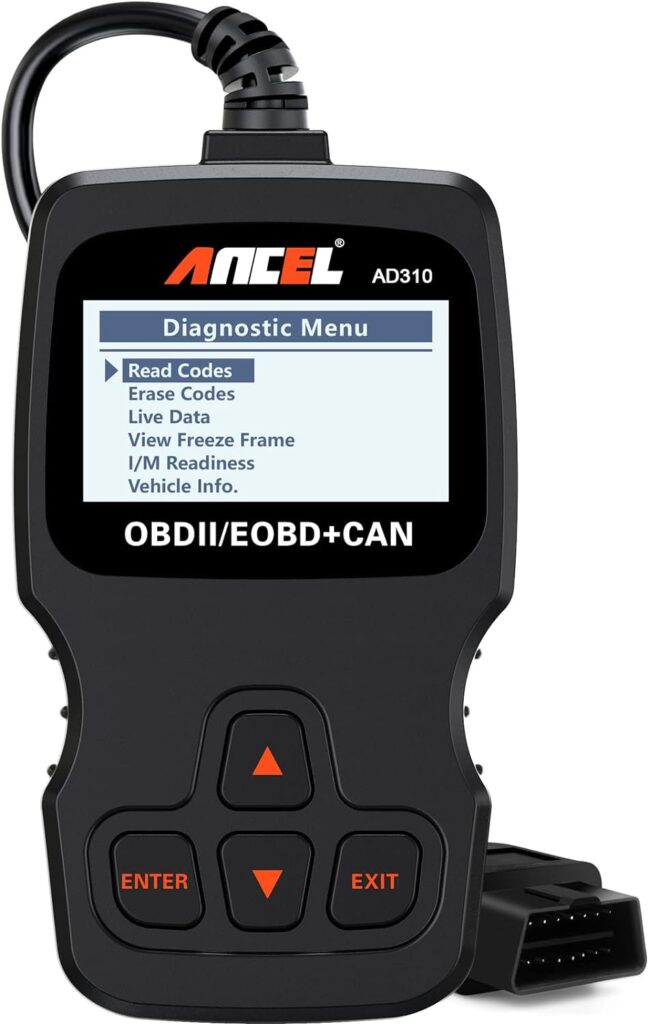
The check engine light (CEL) is one of the most dreaded dashboard warnings for Canadian drivers. It can signal anything from a loose gas cap to a failing catalytic converter. Fortunately, you don’t always need to rush to a mechanic to diagnose and even clear these engine codes. With an affordable tool like the ANCEL AD310 Classic Enhanced Universal OBD II Scanner, Canadians can take control of their vehicle diagnostics from their own garage.
This article will walk you through how to read and clear check engine codes using the ANCEL AD310, including why this tool is ideal for Canadian drivers, and how to handle potential issues that arise after clearing the code.
Why Your Check Engine Light Comes On
The check engine light can be triggered by a wide range of issues:
| Common Trigger | Severity | Recommended Action |
|---|---|---|
| Loose gas cap | Low | Tighten the cap and reset |
| Faulty O2 sensor | Medium | Replace sensor |
| Misfire in engine | High | Inspect immediately |
| Catalytic converter issues | High | Professional inspection needed |
| Mass airflow sensor | Medium | Replace or clean sensor |
In some cases, the light will turn off after fixing the problem. However, the code remains stored in your car’s computer and may require manual clearing.
Why Choose the ANCEL AD310 in Canada?
Priced at $39.99 CAD on Amazon.ca, the ANCEL AD310 is a best-selling OBD II scanner recommended by professional mechanics like Scotty Kilmer. It’s compatible with all 1996+ OBD2 vehicles, including Canadian models.
Key Features:
- Reads and clears DTCs (Diagnostic Trouble Codes)
- Supports all major OBD2 protocols (KWP2000, CAN, J1850, ISO9141)
- Plug-and-play (no battery needed)
- Large 2.4″ display with English language interface
- Freeze frame data, I/M readiness test, live data monitoring
Step-by-Step Guide: How to Clear Check Engine Codes with the ANCEL AD310
Step 1: Locate the OBD-II Port
In most Canadian cars, the OBD-II port is located under the dashboard, near the driver’s seat. It’s a 16-pin connector, typically found above the brake pedal.
Step 2: Plug in the ANCEL AD310
Turn off your engine and plug the scanner into the port. Once connected, the device powers on using your car’s internal battery.
Step 3: Turn On the Ignition
Do not start the engine yet. Simply turn the ignition to the “ON” position. This enables communication between the car’s ECU and the scanner.
Step 4: Read the Codes
Use the arrow keys to navigate the AD310 menu:
- Select “Read Codes”.
- Wait for the scanner to retrieve trouble codes.
- Note down or take pictures of the codes for reference.
The scanner will display the code (e.g., P0420) and a basic description (e.g., “Catalyst System Efficiency Below Threshold”).
Step 5: Research the Code
Before clearing the code, it’s smart to understand the underlying issue. You can look up the code online or in your vehicle’s service manual. If the issue is minor, like a loose gas cap, you can move ahead to clear it. For major engine or emissions problems, consult a professional.
Step 6: Clear the Code
If you’re confident the issue has been resolved:
- Navigate to “Erase Codes” in the AD310 menu.
- Confirm the action.
- The scanner will erase stored codes and turn off the CEL.
Note: The engine light may return if the underlying problem persists or reoccurs.
What to Do After Clearing the Code
1. Drive the Vehicle
After clearing the code, take your vehicle for a 10–15 km drive. The car’s computer will perform system tests to ensure everything functions correctly. If the light stays off, you’re good to go.
2. Perform I/M Readiness Check
The AD310 allows you to check your car’s Inspection & Maintenance readiness status—important if you’re in a province with emissions testing (e.g., Ontario’s Drive Clean for heavy-duty vehicles).
Navigate to “I/M Readiness” to verify that systems like the oxygen sensor, catalyst, and EVAP monitor are functioning correctly.
When Not to Clear the Code Yourself
While DIY diagnostics save time and money, there are situations where you should avoid clearing codes on your own:
- If your car is under warranty – Some dealerships may void warranties if you tamper with diagnostics.
- Persistent or multiple codes – These may indicate larger problems needing a qualified mechanic.
- Before an emissions test – Clearing a code right before inspection can reset the monitors and cause an automatic fail.
Canadian-Specific Considerations
Climate & Battery Health
Cold Canadian winters can trigger CELs due to battery-related issues. Ensure your battery and alternator are functioning correctly before clearing codes.
Vehicle Compatibility in Canada
The ANCEL AD310 supports most Canadian-market vehicles made after 2000. However, always check compatibility using the vehicle identification number (VIN) or consult the product page.
Where to Buy the ANCEL AD310 in Canada
You can purchase the ANCEL AD310 for $39.99 CAD on Amazon.ca, with free delivery available across Canada, including cities like Toronto, Vancouver, Montreal, and smaller towns like Milton or Red Deer. With 51,000+ ratings and a 4.5-star average, it remains one of the most trusted OBD II scanners in the market.
Product Link: Buy ANCEL AD310 on Amazon.ca
Final Thoughts
Clearing your check engine light doesn’t have to be a mystery or an expensive trip to the dealership. With a reliable tool like the ANCEL AD310, Canadian drivers can take charge of their vehicle’s health with confidence. It’s user-friendly, affordable, and highly effective for everyday diagnostics.
Whether you’re a weekend DIYer or just want peace of mind before a long road trip across Canada, this scanner is a smart investment for any car owner.